Faster, Safer, and More Transparent — Automatically
We've shipped a wave of improvements to the platform this month, and the best part is that almost none of them ask anything of you. Your sites are now better protected against attacks, load faster for visitors on real-world networks, and give you a far clearer picture of who's actually visiting — all without a single setting to change.
Here's what's new, and what it means for your sites.
Stronger protection for WordPress logins
If you run WordPress, your login page is under constant, automated attack.
Bots roam the internet around the clock, hammering wp-login.php with thousands
of username and password guesses, hoping to stumble onto a weak credential.
It's relentless, it's noisy, and even when it fails it costs you real server
resources.
We now stop these automated attacks at the network edge — before they ever reach your site.
A lightweight check confirms that a real browser actually loaded your login form before any login attempt is accepted. The bots that blindly POST guesses straight at the login endpoint never make it through. A per-source rate limit backs this up, capping any single abusive address. Both run before any of your site's PHP code executes, so attack traffic no longer burns your CPU and memory.
What this means for you:
- Much better security — the flood of automated login attempts reaching your WordPress admin drops dramatically.
- Faster, more stable sites — resources that were being wasted fending off bots go back to serving your real visitors.
- Zero impact on real logins — anyone who genuinely loads your login page signs in exactly as before.
On sites that were under active attack, automated login attempts reaching the application fell by roughly 97–99% once this went live — while legitimate logins were completely unaffected.
Do you need to do anything? No. It's on automatically for every site.
One-click WordPress hardening that works everywhere
Our control panel has long offered a set of one-click WordPress security controls — things like blocking XML-RPC, disabling the built-in file editor, blocking PHP execution in your uploads folder, turning off directory browsing, and adding protective security headers.
Those toggles now apply reliably across every hosting stack we run, including our high-performance LiteSpeed-based tier. Whatever plan your site is on, flipping a security setting now dependably takes effect.
Why it's worth a look:
- Consistent protection regardless of which plan your site runs on.
- Closes a common attack vector — XML-RPC in particular is frequently abused to amplify brute-force attempts and pingback floods. Blocking it is now a dependable, one-click control.
Do you need to do anything? This one is optional, but recommended. Take a minute to visit WordPress → Security for your sites and switch on the protections you want.
HTTP/3 is now live
We've enabled HTTP/3 — the newest version of the protocol browsers use to load websites — across our edge. Modern browsers automatically upgrade to it on their next visit; everyone else keeps working seamlessly over HTTP/2 and HTTP/1.1.
What your visitors get:
- Faster page loads, especially on mobile and high-latency connections.
- More resilient connections — HTTP/3 recovers from packet loss far better than older protocols, so visitors on spotty Wi-Fi or cellular get a noticeably smoother experience.
- Quicker connection setup — fewer round-trips before your content starts loading.
All of your existing protections — rate limiting, our web application firewall, IP rules — apply to HTTP/3 traffic too. Nothing changes for you, and nothing changes for visitors on older browsers.
Do you need to do anything? No. It's automatic for every site, negotiated transparently by each visitor's browser.
A much clearer view of your traffic
This is the biggest visible upgrade this month. The Site Traffic page has grown from a simple daily total into a genuine analytics view.
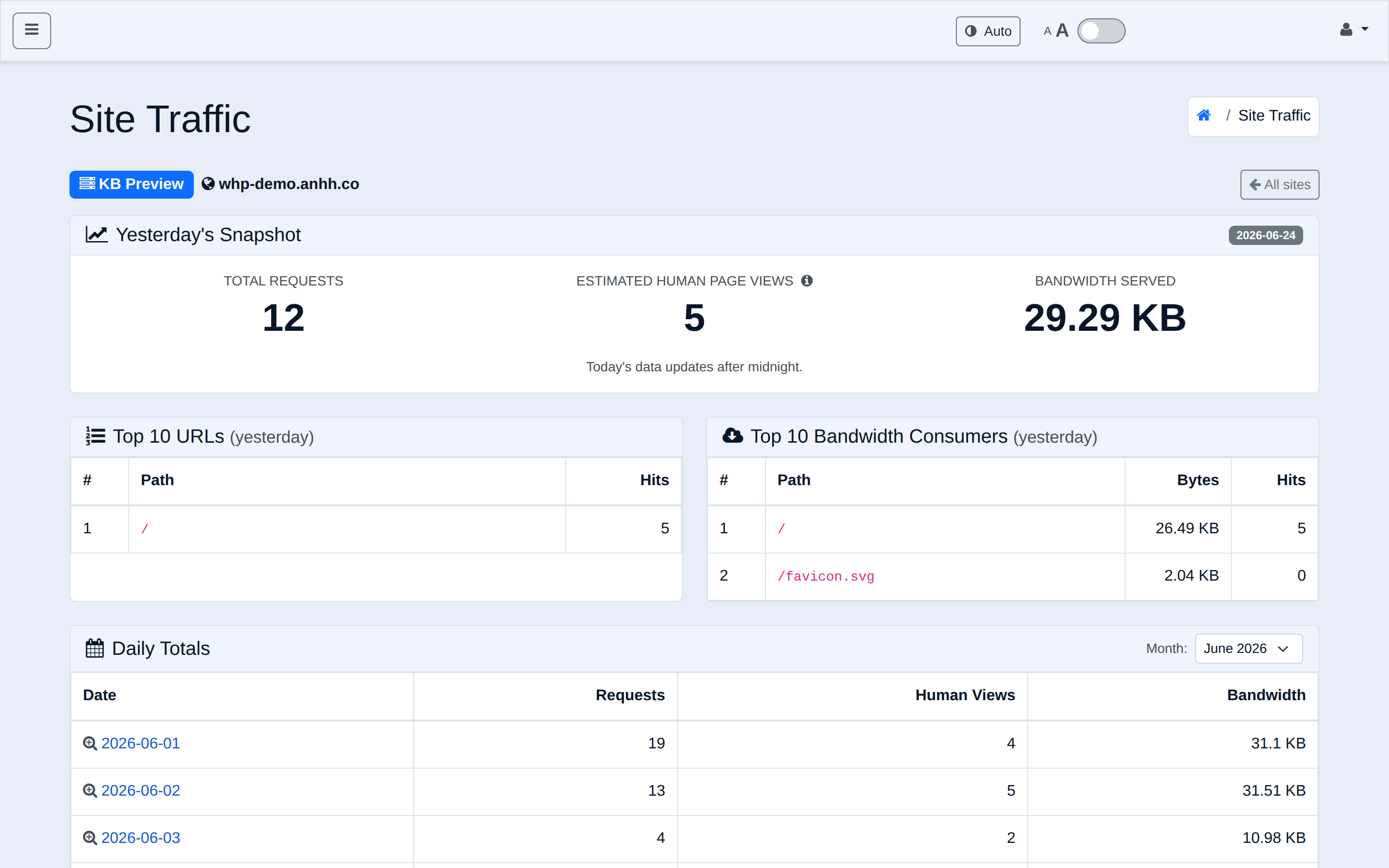
- Hourly breakdown — see how your traffic spreads across the 24 hours of a day, not just one daily number.
- Click any day to drill in — for the last 30 days, click a date to open a detailed report: an hourly request graph, your top pages, your most bandwidth-heavy URLs, and a human-vs-bot split.
- Updates every 30 minutes — today's numbers now refresh throughout the day instead of only once overnight, so you can watch a campaign or a traffic spike unfold in near-real-time.
- Complete coverage — traffic is now captured for every site type, including our LiteSpeed-based tier.
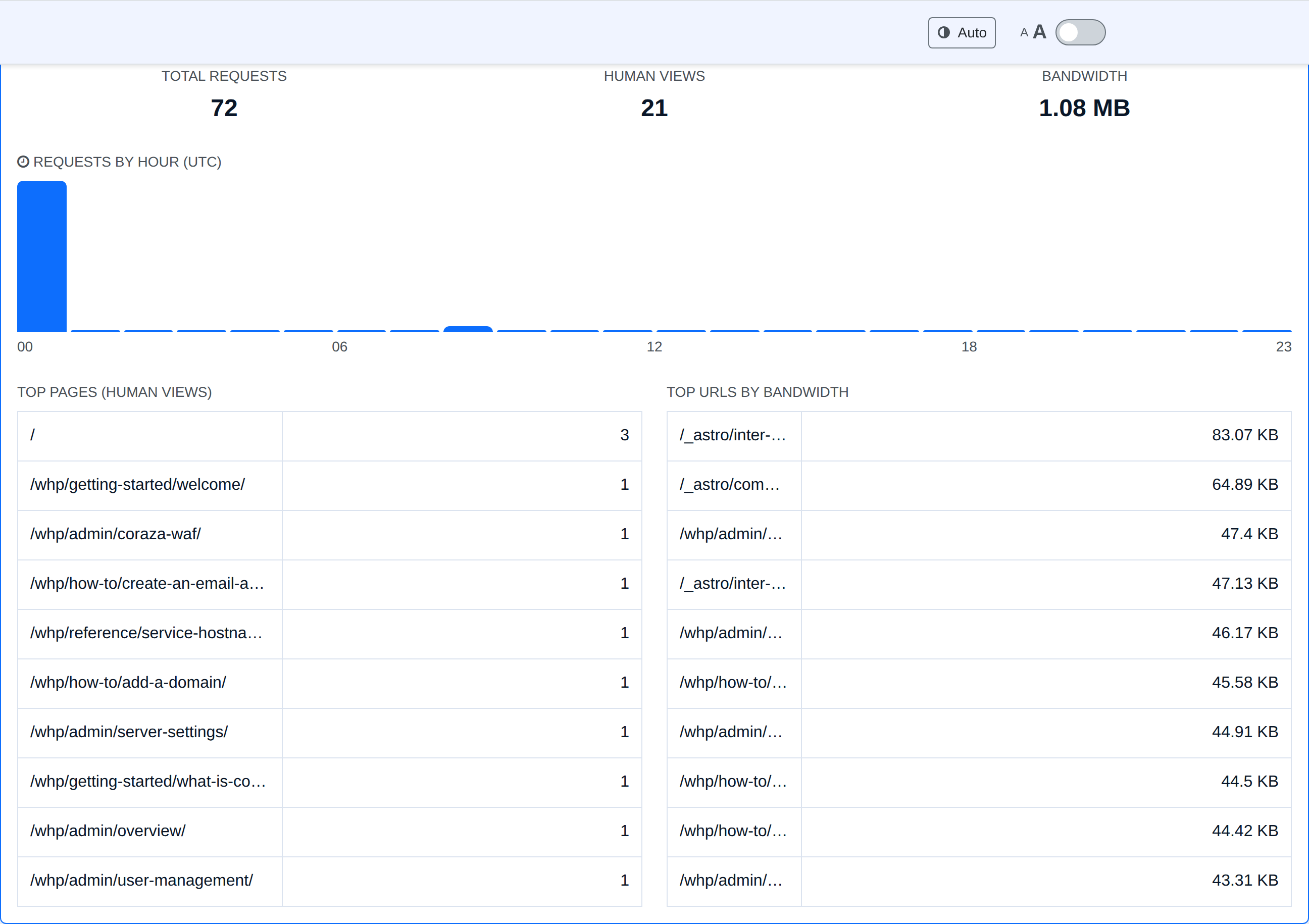
Why you'll like it:
- Understand your audience — when do people actually show up? Which pages are popular? What's eating your bandwidth?
- Spot problems early — near-real-time updates surface unusual traffic, or an attack, the same day it happens.
- Separate real visitors from bots — the human-vs-bot view tells you how much of your traffic is genuine.
Going forward, your traffic is recorded permanently into your analytics history (kept for around 12 months), independent of raw web-server logs. We've backfilled recent history where we could — and your full, detailed history builds from here forward.
Do you need to do anything? No. Just open the Site Traffic page — the data accumulates automatically.
The short version
| What's new | What it means for you | Anything to do? |
|---|---|---|
| WordPress login protection | Far fewer attacks, more stable & secure sites | Nothing — it's on |
| One-click WordPress hardening | Reliable security toggles on every plan | Optional — enable in the panel |
| HTTP/3 (QUIC) | Faster, more resilient page loads | Nothing — it's on |
| Hourly + daily traffic drill-down | Understand visitors, spot spikes | Nothing — just visit the page |
| 30-minute analytics refresh | Near-real-time traffic visibility | Nothing — it's on |
Faster, safer, and more transparent — automatically. That's the goal with every release, and there's more on the way.
As always, if you have questions about any of these, our support team is happy to help.